From logistics document to normalized data your system already understands.
Extract processes invoices, packing lists, declarations and transport forms. It turns items that arrive in different formats into a predictable schema — yours — ready for ERP, customs or warehouse.
- Built for logistics
- Schema made to measure
- Webhook · Excel · API
- +97% accuracy
Extract pipeline — from document to data in minutes
From document to data in minutes — +97% accuracy, no manual intervention.
Every supplier sends the same kind of document… in a different shape
A single clearance can require hundreds of lines copied from PDFs, scans or photos. One wrong digit and the shipment stops.
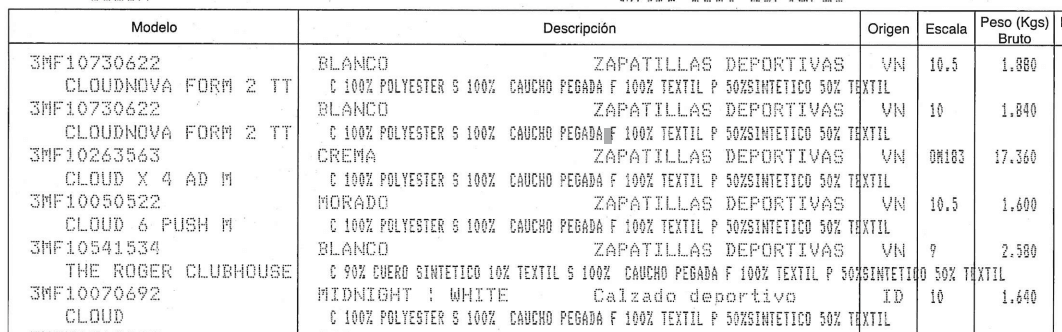
- Mixed fields
- Unformatted units
- Duplicate keys
| sku | producto | color | origen | peso_kg |
|---|---|---|---|---|
| 3MF10730622 | Sports shoe | White | VN | 1.880 |
| 3MF10263563 | Sports shoe | Cream | VN | 17.360 |
| 3MF10070692 | Athletic footwear | Midnight | ID | 1.640 |
- One field, one value
- Your system's keys
- +97% accuracy
Manual work
Hours typing invoices, delivery notes and packing lists.
Unpredictable formats
Different columns per issuer and mixed-up fields.
Generic OCR is not enough
Plain text with no normalization layer.
Operational pressure
More volume, more regulation, thinner margins.
You don't need “more OCR”. You need predictable items carrying your system's keys.
Four steps. From file to usable data.
OCR-Genius understands the logistics document. Extract normalizes it to your schema and delivers it where your stack runs.
One PDF with four documents inside
Auto-split — classification by type before extraction- Commercial invoiceInvoice · pp. 1–3INVOICE
- Packing listPacking List · pp. 4–6PACKING
- Certificate of originEUR.1 · p. 7EUR.1
- Bill of ladingBill of Lading · pp. 8–12B/L
Auto-split: if you don't declare the type, Extract detects it, separates it and routes each document on its own.
Intake
Native or scanned PDF, image or API. Auto-split if you don't declare the type.
Extraction
Headers and items. Disambiguates brand, origin, composition.
Normalization
Match to the fields you defined — with your names.
Delivery
Signed webhook, Excel or dashboard. Versioned template.
Upload the document. Get back the JSON, Excel or webhook your system expects
Tailored to you, not to us. Extract does not sell “generic OCR fields”: it delivers normalized items with the keys, the order and the rules of your operation.
- Upload → payload (typical)
- <60 sUpload → payload (typical)
- Match with your schema
- 100%Match with your schema
- Logistics accuracy
- +97%Logistics accuracy
- Dashboard · API · webhook
- 3Dashboard · API · webhook
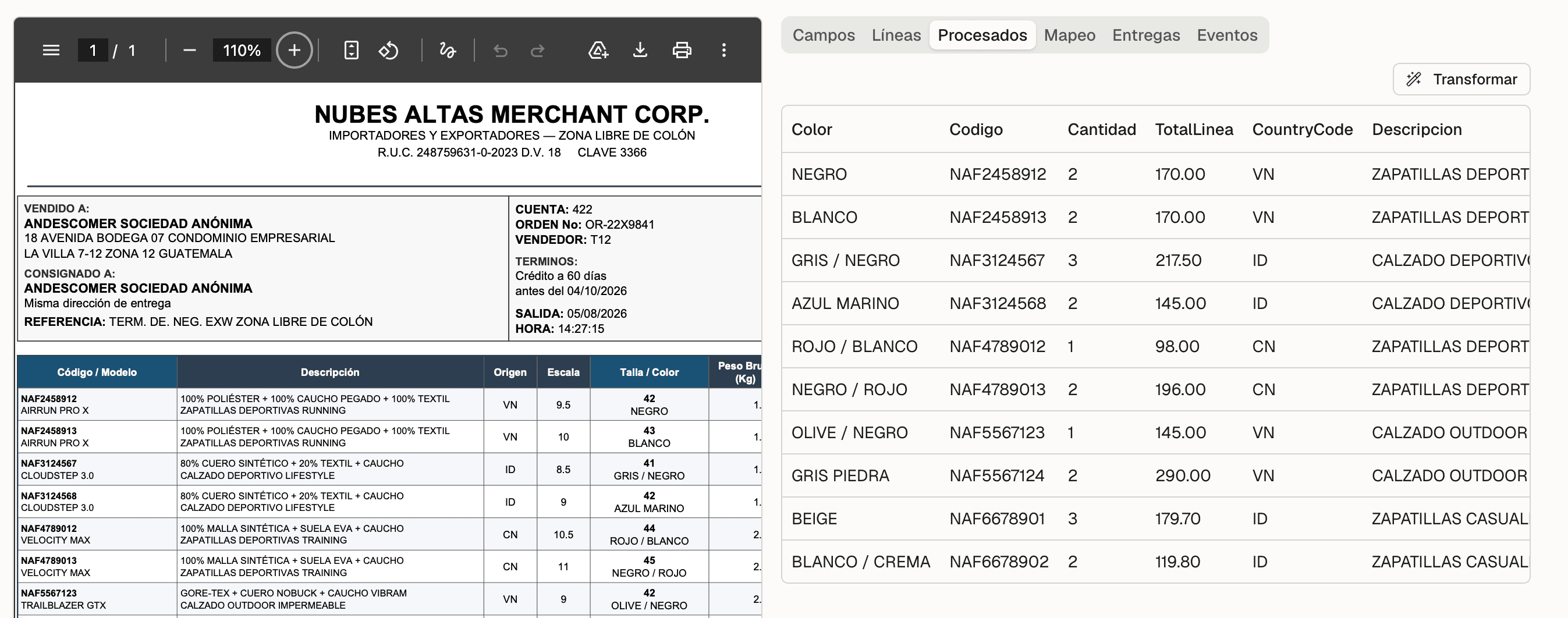
What arrives from the supplier is not what your system consumes
Extract closes that gap without an operator rewriting every line.
Loose columns, unpredictable names
- product_description_[text]
- BREWGILL 45/82 EXP GB170
- shipped_quantity
- 24,000.20
- Price
- 0.84
Fixed rows, your keys
- Descripcion
- BREWGILL 45/82 EXP GB170
- Cantidad
- 24000.20
- Precio
- 0.84
What happens to every document
It arrives through the channel you already use
A web panel for operations, a REST API with a per-organization key, or email to an address of your own. Leave out the document type and Extract detects it and splits it inside the same PDF.
For the operations team — no integration needed.
curl -X POST \https://…ocr-genius.com/api/v1/ingest \-H "Authorization: Bearer ocrg_…" \-F "file=@/path/to/invoice.pdf" \-F "document_type=packing_list"To integrate your ERP, TMS or WMS — or to send in batches.
Forward what you already receive — attachments come in on their own.
Everything on the page, disambiguated
Header and line items, row by row. What comes apart from the description —brand, origin, composition, size— is not lost: it stays on the original items and is promoted to a field if you asked for it.
The schema is yours, not ours
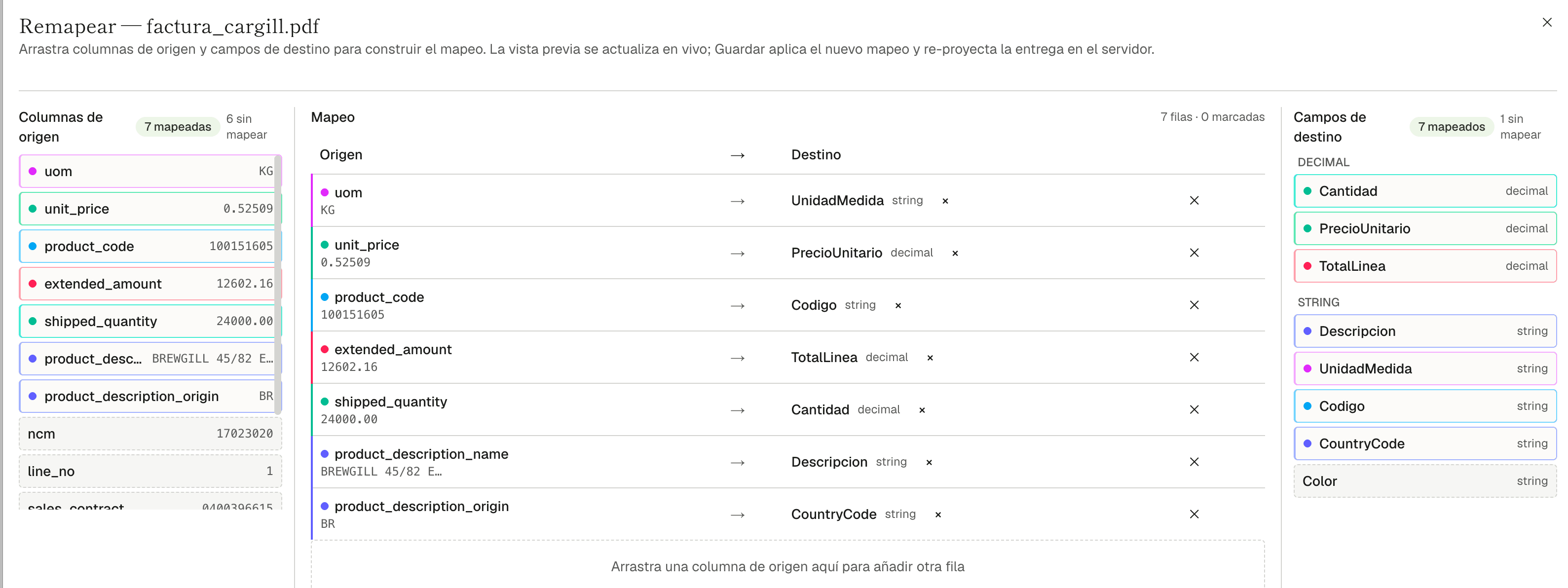
You define your fields with a name and a type. Mapping lines up the columns found in the document with your destinations, and you drag it if you want to change it: the preview updates live and saving re-projects the delivery.
Webhook, Excel or panel — with an audit trail
Every document leaves a record of events. The template is versioned: you remap, reprocess, restore an earlier version or resend the webhook. No more “the OCR failed, upload everything again” loop.
Same payload, three channels — you pick by use case.
Every document leaves a record — no black boxes.
No more “the OCR failed — upload everything again” loop.
Built for the paperwork of the supply chain
Forms with line items and header-only documents. Each type is enabled per organization, with its own fields and template.
- inv
Commercial invoices
Goods lines with prices, weights and codes.
- pl
Packing lists
Containers, packages and cargo detail.
- dua
DUA / DUCA / DUM
Customs declarations with line items, in their Spanish, Central American and North African variants.
- eur
EUR.1
Certificates of origin.
- bl
Bill of Lading
Bills of lading — header and cargo detail.
- +
Other forms
New types by configuration, not by rewriting code.
Why Extract and not “another OCR”
Six product decisions you notice on day one of operation.
The output has the shape of your system
JSON, Excel or webhook with your fields — no mapping layer afterwards.
Predictable line items, not loose text
Typed rows out of a different layout from every supplier.
Three ways in, one funnel
Panel, API and email land in the same pipeline and the same template.
Built for the operator
Remap, reprocess, restore, resend — with an audit trail per document.
Test before you publish
You see the payload that would have been sent. No surprises in production.
The OCR-Genius family
The same logistics document AI; Extract normalizes and delivers.
It comes in through the channel you already use. It leaves in the shape your stack expects.
We are the layer between the supplier's document and your ERP, TMS or WMS.
- api
REST ingest
POST /api/v1/ingest
- hook
HMAC webhooks
Payload in your template, signed.
- xls
Excel export
Headers, line items or both on one sheet.
- erp
ERP · WMS · TMS
By webhook or scheduled export.
That gives you text or generic fields. Extract delivers the exact payload your ERP expects.
Built for people who live off cross-border trade documents
If you recognize yourself in the ideal profile, rollout is measured in days.
- Customs brokers and clearing agents
- Importers and exporters with more than 50 supplier documents a week
- Freight forwarders and multi-country 3PL / 4PL operators
- Teams with an ERP, TMS or WMS who do not want to rewrite mappings
- Too much volume for Excel; too vertical for a generic OCR
- Fewer than a dozen documents a month
- A single supplier with a stable format, already integrated over EDI
- Documents with no line items and no schema of your own, where reading the text is enough
Write to us anyway: if the volume is going to grow, it pays to design the schema before the debt piles up.
Multi-tenant
Your documents are sensitive commercial data. The platform is built accordingly.
Isolation per organization
Data, configuration and templates kept separate per tenant.
Users and roles
Authentication per organization, with per-user permissions.
Hashed API keys
Revocable keys, never stored in plain text.
Signed webhooks
HMAC signature to verify the origin of every delivery.
Encrypted in transit and at rest
Cloud infrastructure in certified data centers.
- Audit trail for configuration, deliveries and resends
- Template version history, with restore
- A record per document: who, when and with which template
Data processing aligned with the GDPR
We send you the technical detail and the processing agreement before the trial.
From the first test invoice to the webhook in production
Five steps. We do the first two with you.
Samples
You send us your three worst PDFs.
Organization
We create your space and enable the document types.
Fields
You define your schema and publish it.
Template
You pick the output: JSON, Excel or webhook.
In production
API key and destination URL. Off you go.
Send us 3 of your worst invoices / packing list / any other document. Within 24 hours we send back the normalized JSON / excel.
What people usually ask us before the trial
Start processing your documents with efficiency and accuracy