
From email to ledger entry: invoices extracted, routed and approved.
Suppliers still send PDFs. Invoice Approval ingests them, extracts every field with AI, routes them to the right approver and leaves a searchable digital archive ready for accounting.
- No supplier portal
- Spain + Argentina
- Email · API · Manual
- Full audit trail
- Email · API · UploadArrives however the supplier sends it
- AI OCRExtraction with +97% accuracy
- RoutingTo the right approver, by rules
- ApprovalOne click, fully traceable
- ERP + ArchiveLedger entry and searchable archive
From document to data in minutes — no manual intervention
Invoices don't get lost in the PDF. They get lost in the process.
Companies handling dozens or hundreds of invoices a month still run on a shared mailbox, Excel and forwarded emails. OCR alone is not enough: the human circuit and the visibility are missing.
Chaotic shared mailbox
Threads get lost. Two people work the same invoice. Nobody knows what's pending.
Approval without context
The approver opens a loose PDF: no purchase order, no validated lines, no history.
No trail for audits
“Who approved this, and when?” gets answered by digging through email.
Fragile export to the ERP
Manual re-typing, inconsistent formats, delays and double-payment risk.
You don't need enterprise payment software. You need visibility, routing, decision and archive.
From reception to the accounting system, in a single flow
OCR-Genius understands the document. Invoice Approval orchestrates the company's workflow.
Ingestion
Dedicated email, partner API or manual upload
Extraction
Header, taxes, lines, PO, delivery note
Routing
Rules by supplier, sender or department
Approval
PDF and data together: approve, reject or claim
Output
CSV/XLSX, custom reports, API and webhooks
Archive
History, PDF dossier, full-text search
The full circuit of the received invoice
Six capabilities. One system of record for accounts payable.
Flexible ingestion
It comes in through the channel you already use. Same queue, same OCR, same circuit.
- Email — suppliers write to a dedicated address, no portal.
- API — ERP or connector, with key and idempotency.
- Manual — PDF or image upload from the app.
Smart invoice OCR
Not “reading the PDF”: understanding the purchase invoice, in Spain and Argentina.
- Issuer, receiver, NIF/CUIT, dates, amounts and currency.
- Local taxes: VAT, withholdings, surcharges, percepciones, CAE.
- Multi-page lines with code, quantity, price and line VAT.
- Per-field confidence, warnings and audited human corrections.
Approval workflow
Roles and queues like a real company.
- States: OCR → unassigned → pending → approved or rejected.
- Routing rules to a person or a department.
- Unassigned queue with claim-approve and claim-reject.
- Duplicates by fiscal triple held in quarantine.
Reports and exports
Finance exports the cut it needs, in the format the accountants ask for.
- Filters by supplier, dates, amount, PO, delivery note, department or status.
- CSV and Excel.
- Custom templates: columns and transforms for money, dates and lookups.
- History: regenerate or download the original copy from that day.
Searchable digital archive
The invoice stops being a PDF in a folder.
- The tenant's complete repository, by role.
- Search across header, lines, codes, POs and delivery notes.
- PDF dossier: original, attachments and history.
- Complementary documents without breaking the workflow.
Bridge to the accounting system
A layer between the mailbox and the ERP — not rip-and-replace.
- Ingestion and read APIs.
- Signed webhooks: OCR ready, invoice decided.
- Exports ready for posting.
- The ERP receives data already validated and approved.
What happens to each invoice
The supplier changes nothing
Three doors in, a single flow. Email for the day to day, API for the partner or the ERP, manual upload for the exceptions. However it arrives, the invoice joins the same queue with OCR already running.
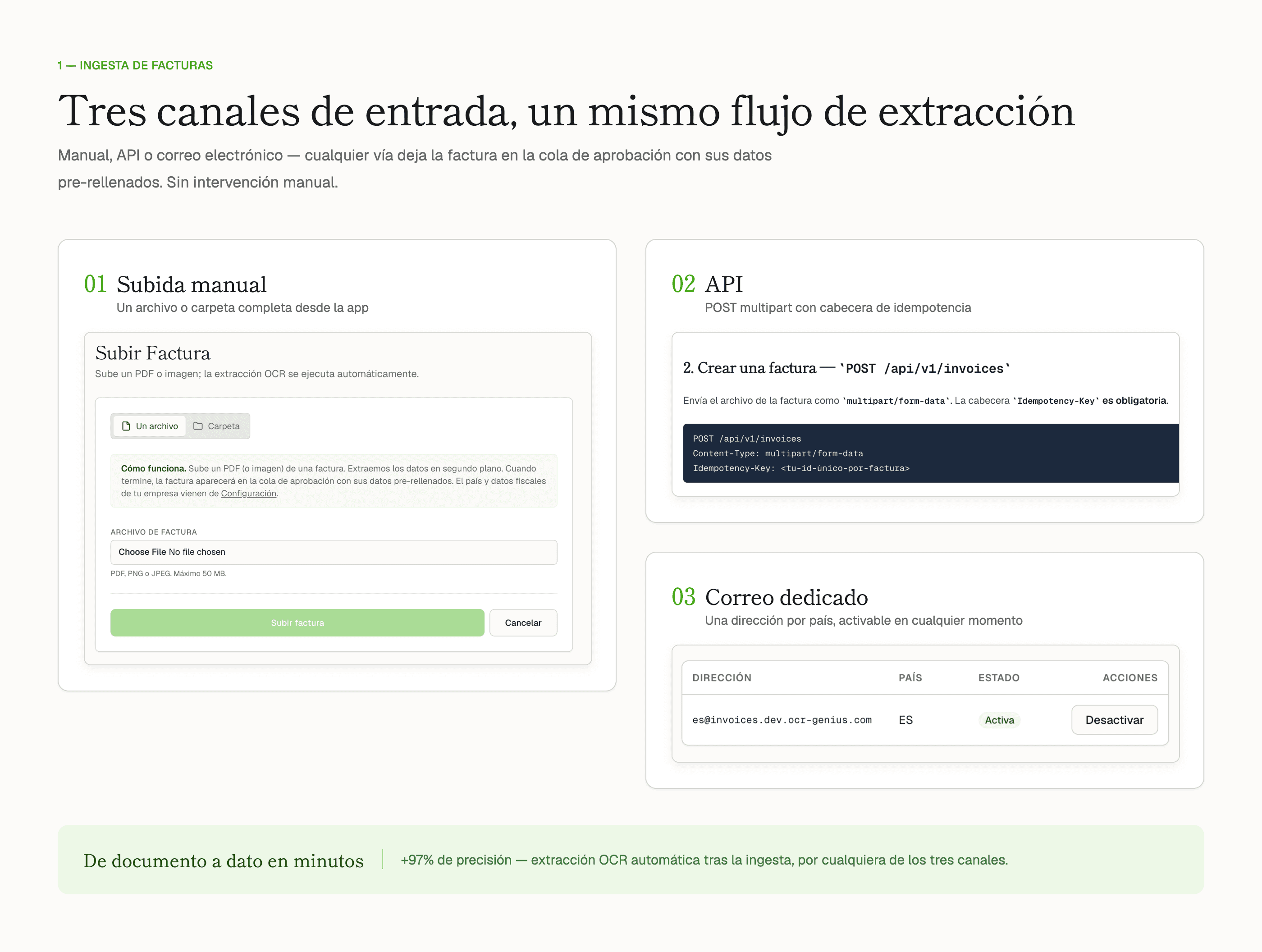
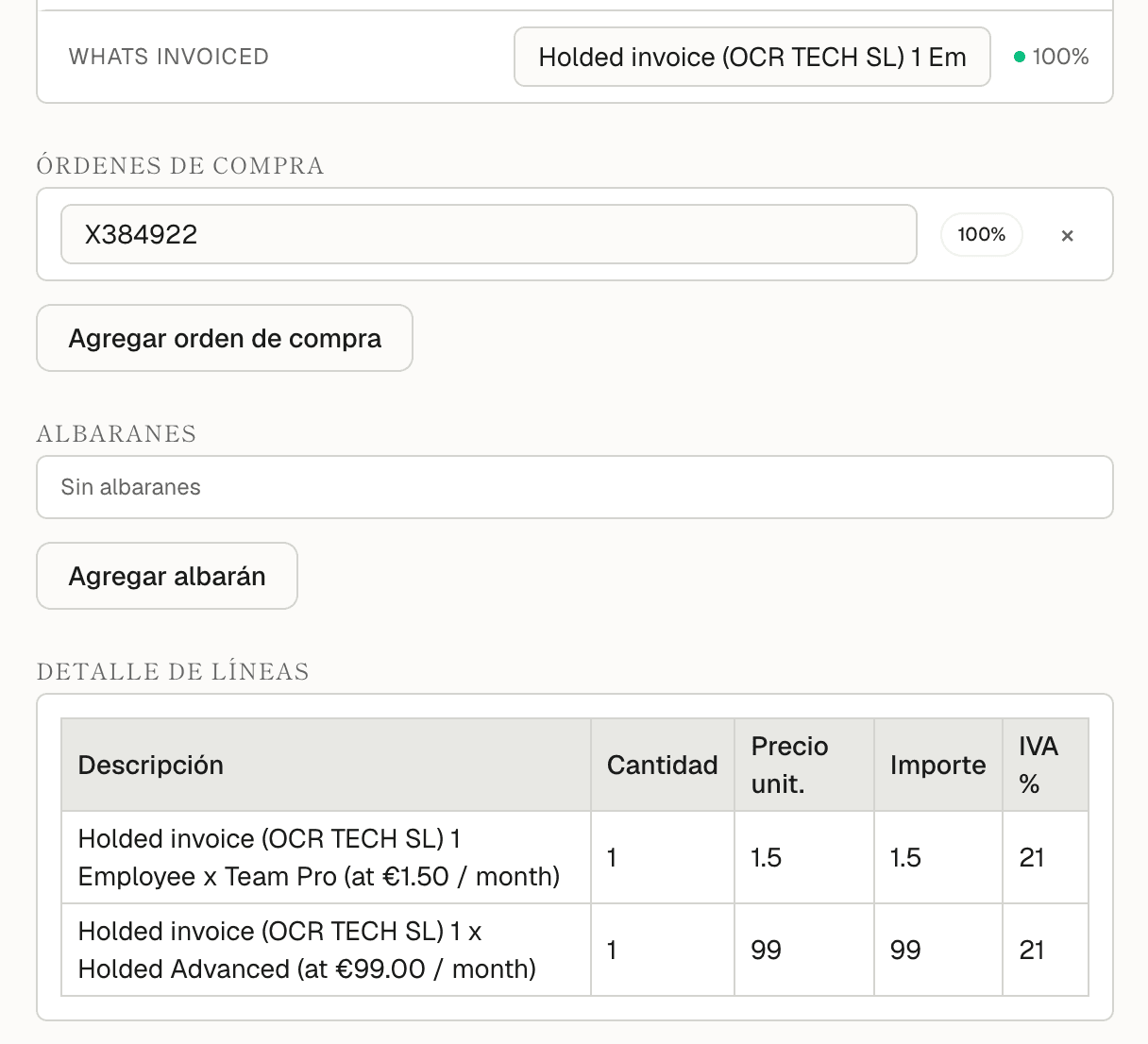
All the data that matters, not just the total
Header, taxes, lines, purchase orders and delivery notes. Every field arrives with its confidence level and a warning when something doesn't add up.
- Issuer
- NIF / CUIT
- Receiver
- Date
- Invoice no.
- Totals
- VAT and taxes
- Lines
- Item code
- Purchase orders
- Delivery note
- Payment terms
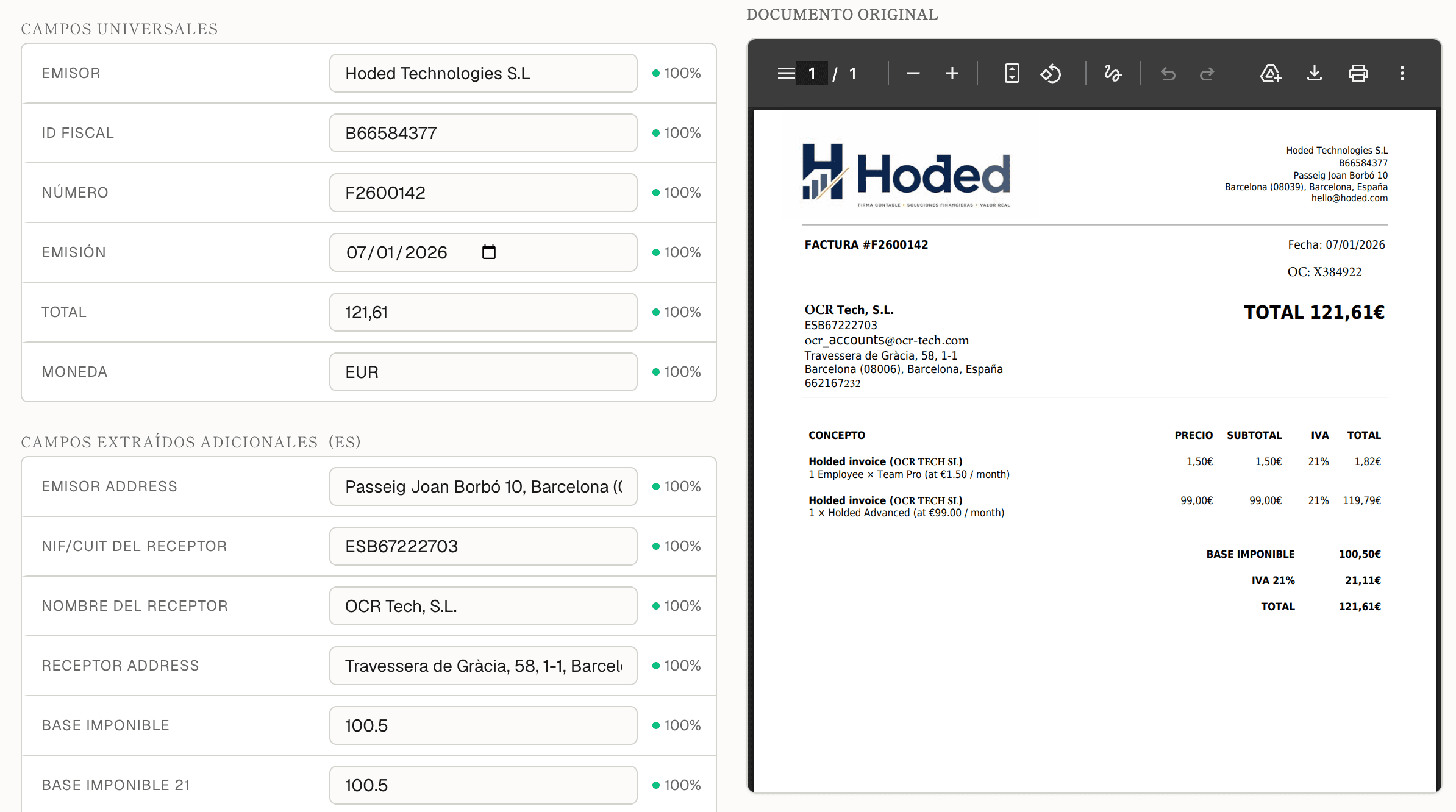
Decide with context, not blind
The approver sees the original document and the extracted data on the same screen. Approve or reject in one click, with a mandatory comment on rejection. Department heads claim from the queue and every action lands in the history.
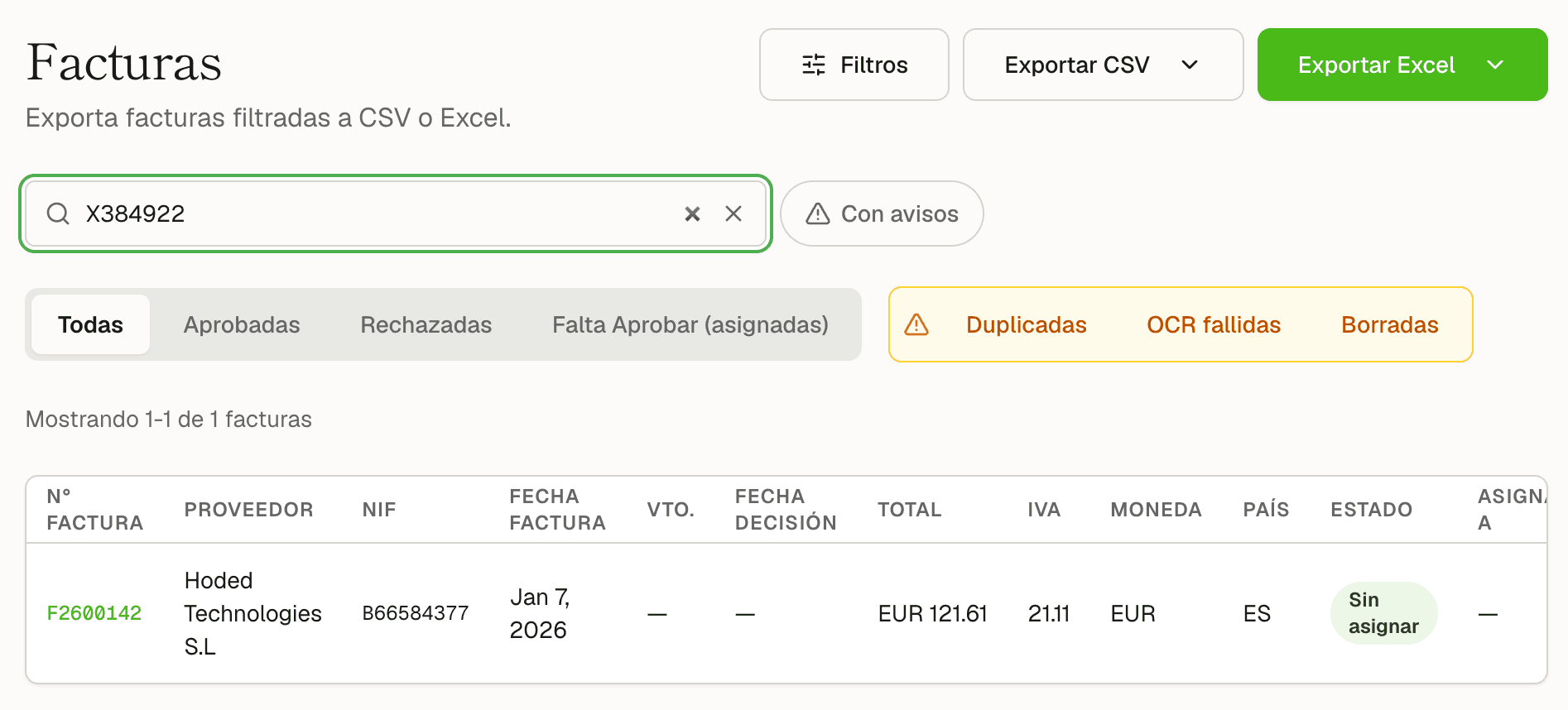
Find it in seconds. Export it the way accounting asks
Search by a line code, a delivery note or a fragment of the supplier's name. Export the month's cut, download the dossier for the accountants, regenerate a report or retrieve the exact copy from the day it was exported.
Built for companies that no longer fit in a shared mailbox
Ideal profile
- 50–200+ invoices a month
- Several approvers or departments
- Operating in Spain, Argentina or both
- Have an ERP, or will
- Too much volume for Excel alone
Personas
- AP / Admin
- A clear queue of what's missing
- Approver
- Decides in one click, with context
- Dept. head
- Claims and sees their own
- Finance
- Reports and exports
- IT / Partner
- API and webhooks
It fits your stack. It doesn't replace it.
We are the layer between the mailbox and the ERP: extract, approve, export.
Corporate email
Aliases per country, forwarding from your current mailbox.
ERP and accounting
Exports ready for posting, no re-typing.
Partner API
Ingestion and read with key and idempotency.
Signed webhooks
OCR ready and invoice decided, HMAC-signed.
Why Invoice Approval
Zero supplier onboarding
They keep emailing the PDF, like always.
Real invoice OCR (ES + AR)
Header, local taxes, lines, PO and delivery note or remito.
Workflow, archive and reports in one product
Not three tools taped together.
A real organizational model
Departments, roles, queues and claim-approve.
Search across all content
Including line codes and delivery notes, not just fixed columns.
The OCR-Genius family
The same document AI that processes complex logistics documents.
Per-tenant AI hints
Teach a supplier's quirks without waiting for a redeploy.
Production multi-tenant
- Tenant isolation
- User authentication
- Hashed API keys
- HMAC-signed webhooks
- Secure export
- Audit of decisions and of admin actions.
- Cloud infrastructure with encryption in transit and at rest.
- GDPR approach for billing data.
In production in days, not a six-month project
- Dedicated email and admin
- Invite users
- Routing rules and departments
- Test with real invoices
- Connect the export or API to the ERP
Email and first user: under a day. Rules: an afternoon. Up and running: about a week.
Stop managing invoices over email
Ask for a demo or send us five sample invoices. We return the extraction and show you the full circuit.
You can also see OCR-Genius for logistics document extraction →
Frequently asked questions
Can't find what you're looking for? Contact us