
You got paid the net. The rest arrived as certificates.
When a customer that acts as a withholding agent pays you, it transfers part of the amount and sends a payment order plus one certificate per tax, each in its own format. Withholdings reads them, groups them into a payment, reconciles against what you collected, allocates each withholding to its invoice and posts it to your ERP or leaves the file ready to import.
- Income tax · VAT · SUSS · IIBB
- All 24 IIBB jurisdictions
- PDF, image and Excel
- Reconciled against the payment order
- A 00003-00000880ARS 600,000.00
- A 00003-00000911ARS 1,400,000.00
- Income taxARS 32,000.00
- IIBB CABAARS 70,000.00
- IIBB Buenos AiresARS 12,000.00
- 6 lines allocated to their invoices
- Posted to the ERP or ready to import
The money arrives in a day. The paperwork, in two weeks.
Every large customer withholds income tax, VAT, social security or gross income tax for several provinces. What they transfer matches no invoice, and closing the collection means gathering by hand everything that explains the difference.
One format per customer
Each agent issues its certificate and payment order however its system produces them: PDF, a scan or the spreadsheet its ERP exports.
Paperwork that arrives separately
The payment order comes with the transfer; the certificates, days later, by email and sometimes to someone else.
One withholding, several invoices
One income tax certificate covers two or three invoices. It has to be split so each part lands on the right invoice.
The ERP doesn't find out on its own
Someone enters each certificate with its payment method and invoice, without duplicating one that was already there or missing one that hasn't arrived.
Until that happens, the customer's account shows a balance that doesn't exist and the certificates wait in a folder.
From the inbox to your ERP
Intake
A dedicated email inbox, file or folder upload, or API. PDF, image and Excel spreadsheets.
Reading
Splits the documents in each file, recognises certificate, payment order or payment notice, and reads every withholding line.
Building the payment
Matches payment orders, certificates and invoices, and groups everything that belongs to the same collection.
Reconciliation and allocation
Checks that gross, withholdings and collected add up, and splits each withholding across its invoices.
ERP
Queries your ERP and posts each withholding, or builds the period's import file, with what goes in and what doesn't.
Groups the paperwork that belongs to the same collection
Documents don't arrive together or in order. Withholdings links them by what they say, not by when they arrived, and never mixes two customers in one payment.
- Payment order00001-00017633 · by email
- Certificate · Income taxRG 830 Regime 94 · PDF
- Certificate · IIBB CABAAGIP · scan
- Certificate · IIBB PBAARBA · PDF
- Payment noticeCustomer's Excel spreadsheet
- The certificate cites the payment order number
- The payment order lists the certificate number
- They share an invoice
- Two certificates cite the same payment order
- Amount and tax match exactly one line of the payment order
If one certificate adds up several payment order lines, one per invoice, it detects that too.
- CompleteAll paperwork is in and it adds up
- Missing certificatesThe order withholds something that hasn't arrived
- Doesn't match the orderThe amounts don't add up
- Waiting for the orderCertificates are in, the payment order isn't
- No invoiceIt's unclear which invoice it belongs to
- Loose certificateNothing to group it with yet
Every peso accounted for, every withholding on its invoice
First it checks that the collection adds up. Then it splits each withholding across the invoices it pays.
Payment order reconciliation
If the difference isn't zero, the payment is flagged as «Doesn't match the order» before it reaches accounting.
- Income taxARS 32,000.00
- IIBB CABAARS 70,000.00
- IIBB Buenos AiresARS 12,000.00
Allocation
Each withholding is split in proportion to what the payment order applies to each invoice, and carries the payment method your ERP uses for that tax.
| Withholding | Invoice | Allocated | Payment method (ERP) |
|---|---|---|---|
| Income taxARS 32,000.00 | A 00003-0000088030% | ARS 9,600.00 | 1 · Income tax withholdingMedium |
| A 00003-0000091170% | ARS 22,400.00 | 1 · Income tax withholdingMedium | |
| IIBB CABAARS 70,000.00 | A 00003-0000088030% | ARS 21,000.00 | 2 · IIBB CABA withholdingMedium |
| A 00003-0000091170% | ARS 49,000.00 | 2 · IIBB CABA withholdingMedium | |
| IIBB Buenos AiresARS 12,000.00 | A 00003-0000088030% | ARS 3,600.00 | 3 · IIBB Buenos Aires withholdingMedium |
| A 00003-0000091170% | ARS 8,400.00 | 3 · IIBB Buenos Aires withholdingMedium |
- High
- A single invoice, linked by number
- Medium
- Split across invoices or linked by amount
- Low
- Invoice inferred from the customer's open invoices in the ERP
- Unallocated
- No invoice identified: left for review
Credit notes are applied to the payment but never receive withholdings.
What your collections team sees
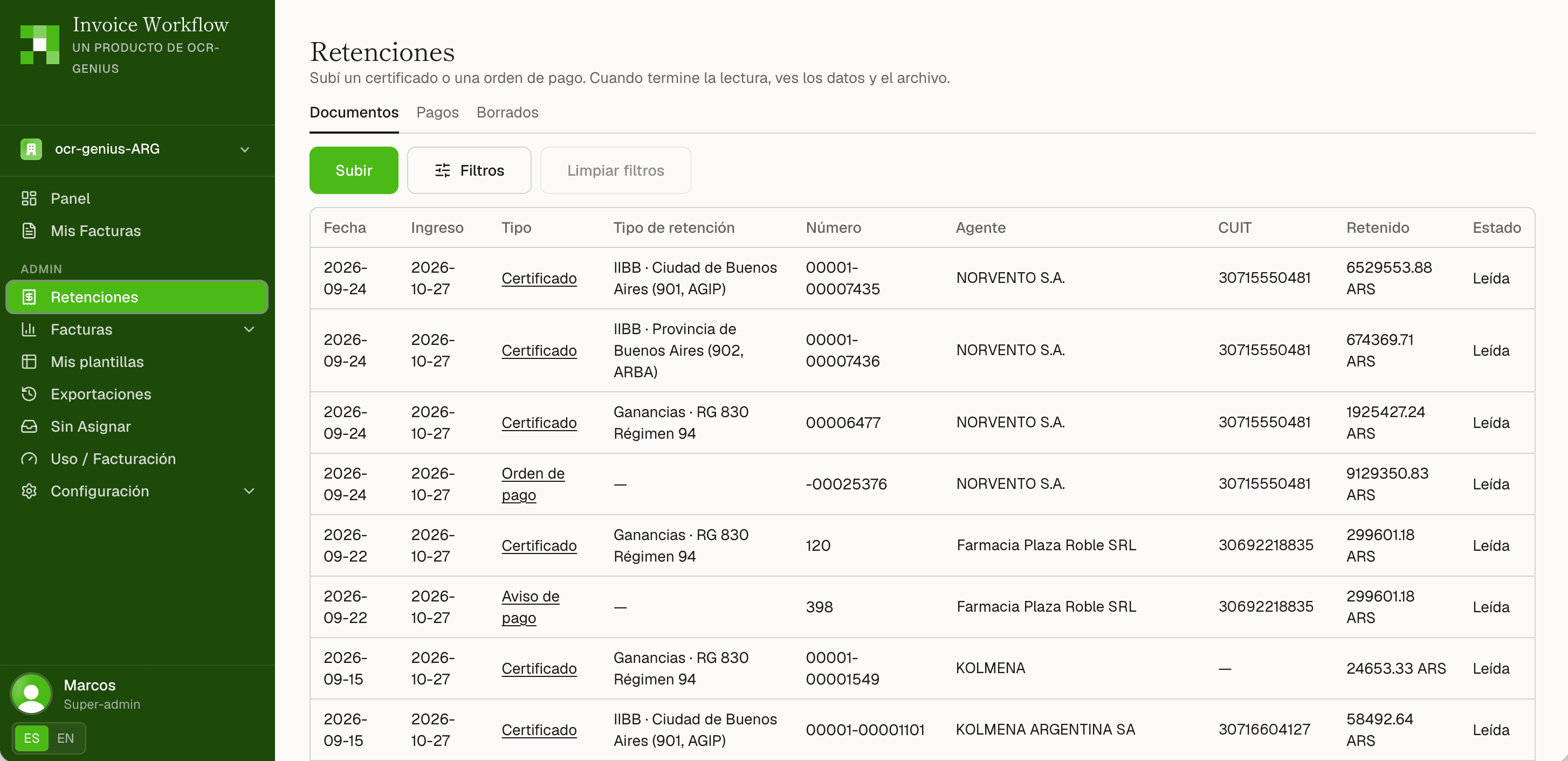
Every certificate and order, read
Each document with its type, tax and jurisdiction, the agent, its CUIT and the amount withheld, with filters to find any certificate.
Every payment, reconciled and allocated
The payment order and its certificates on one screen: why they were grouped, the reconciliation against what was collected and each withholding allocated to its invoice, with your ERP's answer.
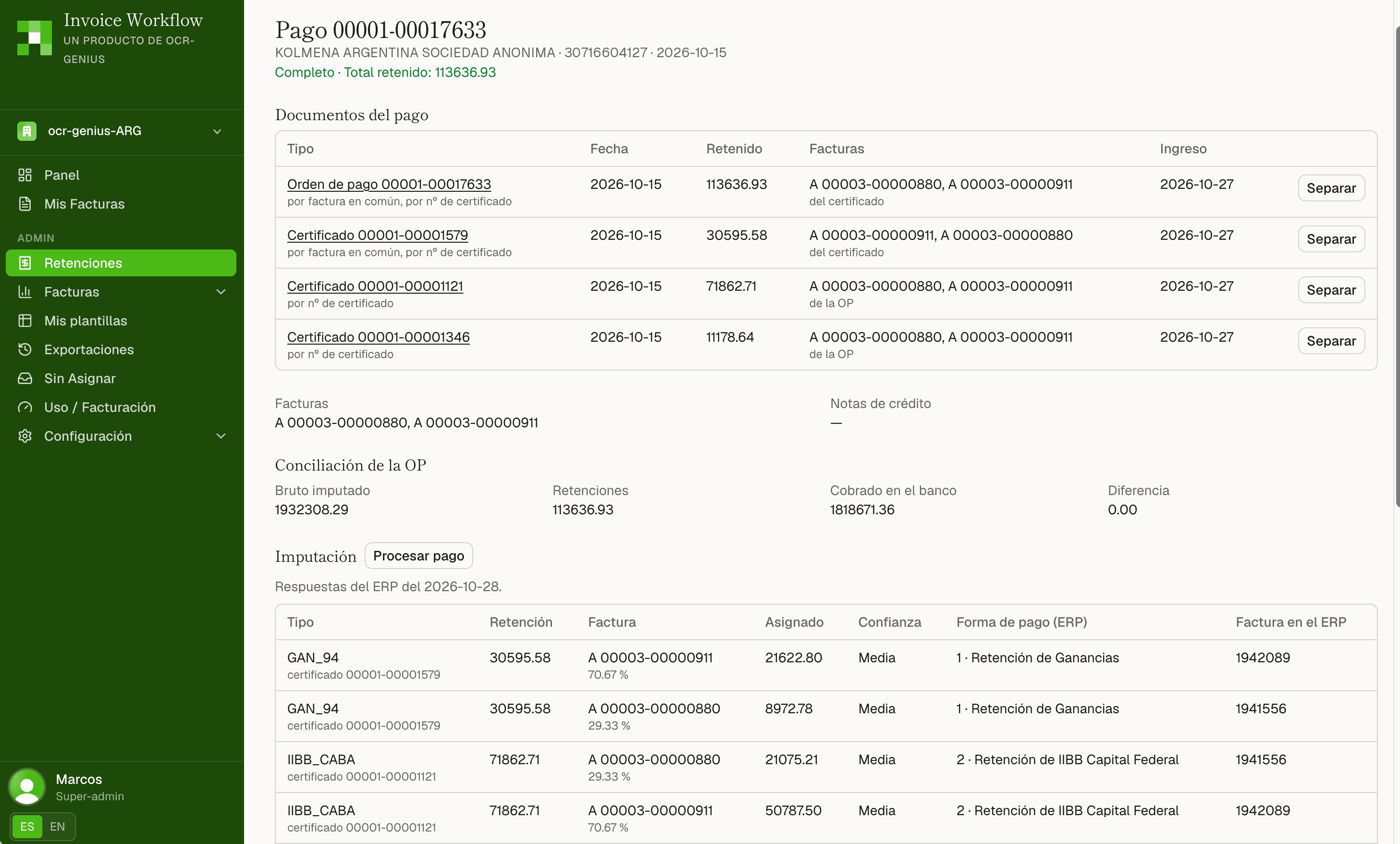
Real product screenshots, shown in Spanish. Company names and CUITs are fictitious.
It asks your ERP. Then it posts directly, or hands you the import file.
Withholdings connects to your ERP and gets there in two ways: it posts each withholding directly, allocated to its invoice and with its payment method, or it prepares the import in the format your ERP already accepts. It doesn't replace your accounting system: it feeds it.
What it checks
- Whether the customer exists, and under which code
- Whether the cited invoices exist, and whose they are
- Whether the certificate or the collection is already recorded
- The customer's open invoices, when the paperwork doesn't name them
- The payment method and account for each withholding type
It checks on its own when each document is read, and again whenever someone asks.
How it reaches your ERP
- Direct postingRecords each withholding in your ERP, allocated to its invoice and with the payment method for that tax, without going through a file.
- Import templateCSV or Excel with the columns, order and codes your ERP expects, one row per withholding, with a stable external ID.
- Period workbookThe whole fiscal month: summary, allocation, certificates, reconciliation of each order, payments and alerts.
- What stays out, and whyEvery withholding left out of the posting or the import, with the reason and what to do to fix it.
The regimes your customers withhold
- Income tax (Ganancias)RG 830 · regimes 94 (services) and 78 (goods for resale)
- VATWithholding on services and leases
- SUSSGeneral regime · RG 1784
- City of Buenos Aires
- Buenos Aires
- Catamarca
- Córdoba
- Corrientes
- Chaco
- Chubut
- Entre Ríos
- Formosa
- Jujuy
- La Pampa
- La Rioja
- Mendoza
- Misiones
- Neuquén
- Río Negro
- Salta
- San Juan
- San Luis
- Santa Cruz
- Santa Fe
- Santiago del Estero
- Tierra del Fuego
- Tucumán
Perceptions are read too, but kept apart: the seller added them to its invoice and they are not allocated as withholdings.
Nothing entered twice. Nothing lost without a warning.
Duplicates, in two layers
The same file can't be uploaded again. And the same certificate inside another file, rescanned or regenerated, is flagged as a repeat.
Alerts that explain
A CUIT with an invalid check digit, lines that don't add up to the total, base times rate that doesn't match, an order that doesn't reconcile, a certificate listed on the order that never arrived.
Audited corrections
Every correction keeps the original reading, who made it, when and why. «View invoices» and «Use this one» fix the invoice in one click.
Split, join, delete and restore
If a document landed in the wrong payment, move it; every manual change is listed and can be undone. Deleted items stay in their tab, with who and when.
Send us a real payment
A payment order and its certificates, exactly as you receive them. In the demo we show you the payment built, reconciled and allocated.
Withholdings is a module of Invoice Workflow →
Frequently asked questions
Can't find your question? Write to us →